Building Inspection Apps for iPad
Building inspection apps for iPad have to keep pace with more than a single-family resale: more floors, more systems, more code exposure to document before you leave. PadInspector walks the structure with you, drafts each finding as you talk through it by area, and links the applicable code section automatically so nothing gets lost between the mechanical room and the roof.
A Bigger Building Means More Ways to Fall Behind
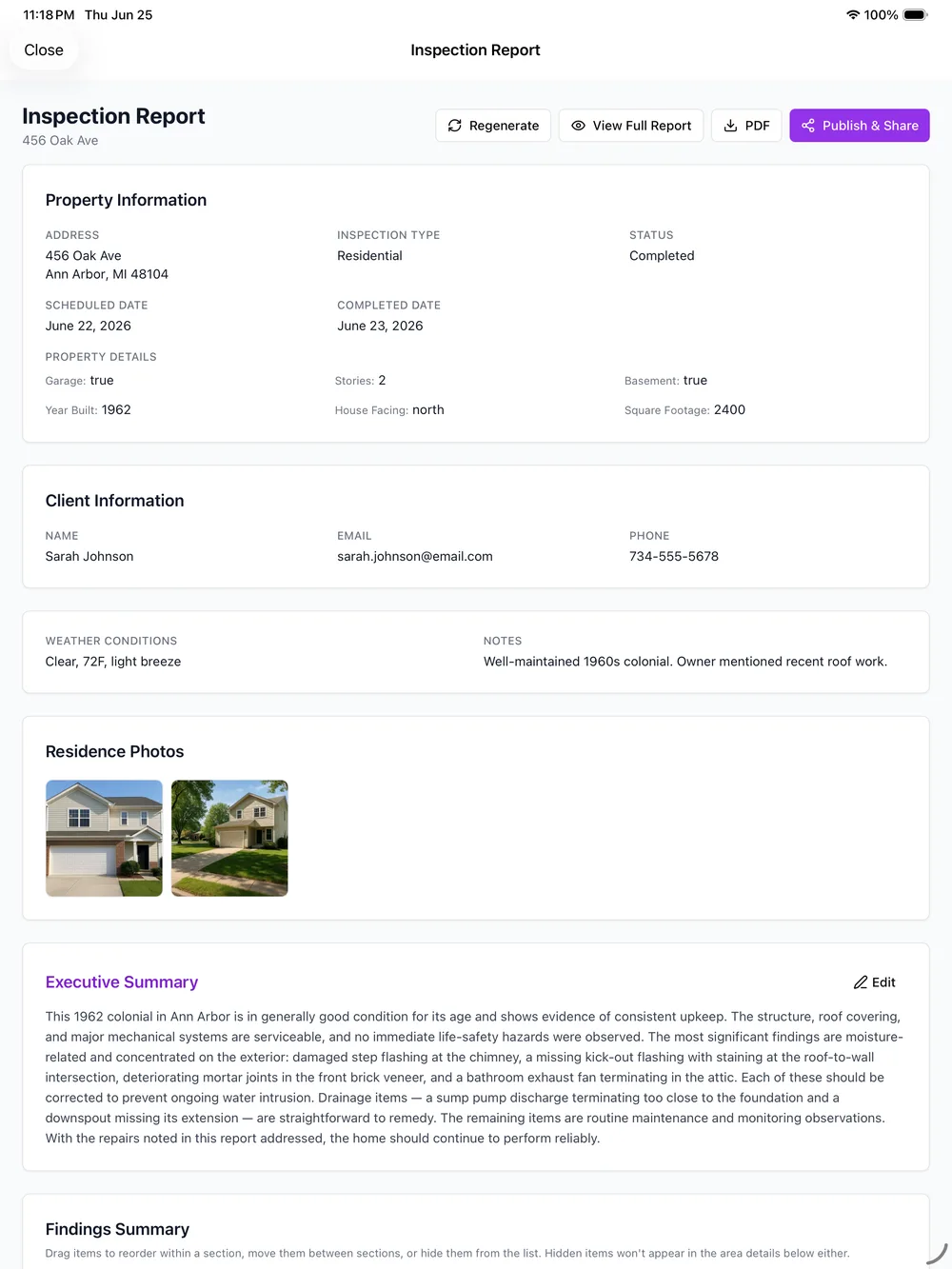
A larger structure, whether that is a multi-unit building or a single property with more systems and floors than a typical resale, multiplies everything: more areas to cover, more code sections that could apply, and more chances for two inspectors on the same job to duplicate a room or miss one entirely.
Plenty of iPad inspection software gets slower and heavier the longer a job runs, loading a busy dashboard between rooms instead of staying out of the way. On a job that already has more ground to cover, that friction adds up fast, and it is exactly the moment a lightweight, voice-first walkthrough matters most.
Built to Cover More Ground, Not Slow You Down
The same walk-and-talk flow that works for a single-family home holds up on a bigger structure, because it never asks you to stop and manage software between areas.
Voice capture per area or system
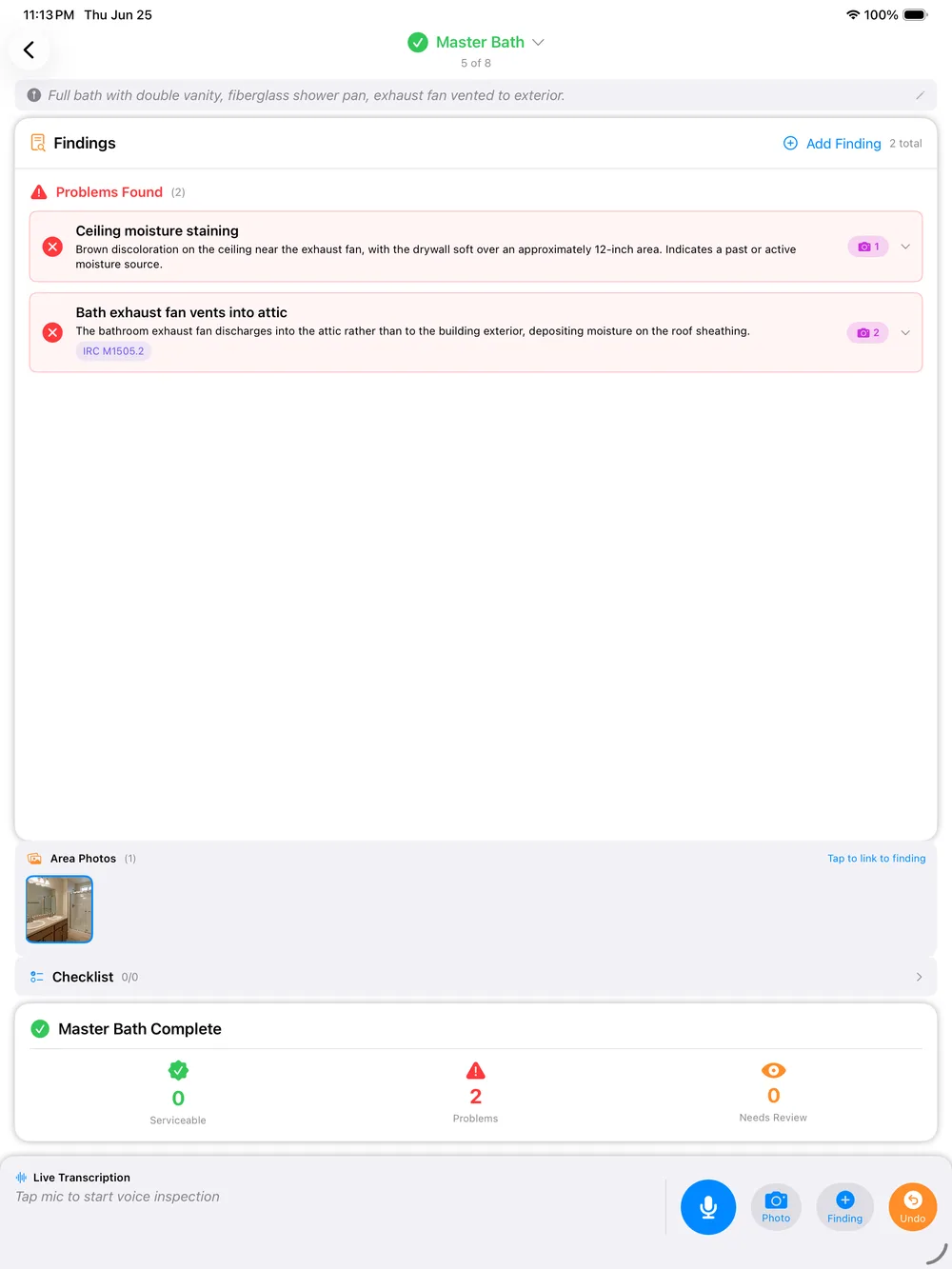
Walk the structure floor by floor or system by system and talk through each finding. It attaches to the right area as you speak, so a bigger building does not turn into a pile of unsorted notes.
Automatic code-violation lookup
When a finding matches a requirement, PadInspector links the applicable IRC, NEC, or state code section automatically. No pausing a walkthrough to search a codebook on a job with more systems to check.
Team mode for multi-inspector jobs
Put more than one inspector on a large building and everyone sees who has covered which area in real time, so nothing gets double-checked and nothing gets skipped.
Fully offline, even from a recorded video
Mechanical rooms, stairwells, and basements are exactly where a signal disappears. Recording, transcription, and drafting all run on the device, and a report can be built from a recorded video afterward if you had zero connection.
Weather logged automatically
Every job logs the day’s weather on its own, which matters on a bigger structure where a moisture or drainage finding is more likely to get questioned later.
Native on iPad, iPhone, and Apple Watch
The iPad leads the walkthrough with a big screen for reviewing the draft, and the app is native across iPhone and Apple Watch for the moments the iPad does not fit.
Working a routine single-family walkthrough instead? See home inspection software for iPad, or browse inspection software systems for the platform-wide view.
How It Works on a Bigger Job
- 01
Split the building
If more than one inspector is on the job, team mode shows who is covering which floor or system before anyone starts.
- 02
Walk and talk each area
Move through the structure area by area, system by system, describing what you see as you go.
- 03
Codes link as you go
A matching finding gets its IRC, NEC, or state code section attached automatically, no separate lookup.
- 04
Review, sign off, send
Skim the drafted report by area on the iPad screen, adjust anything, and send it before you leave the property.
What a PadInspector Report Actually Contains
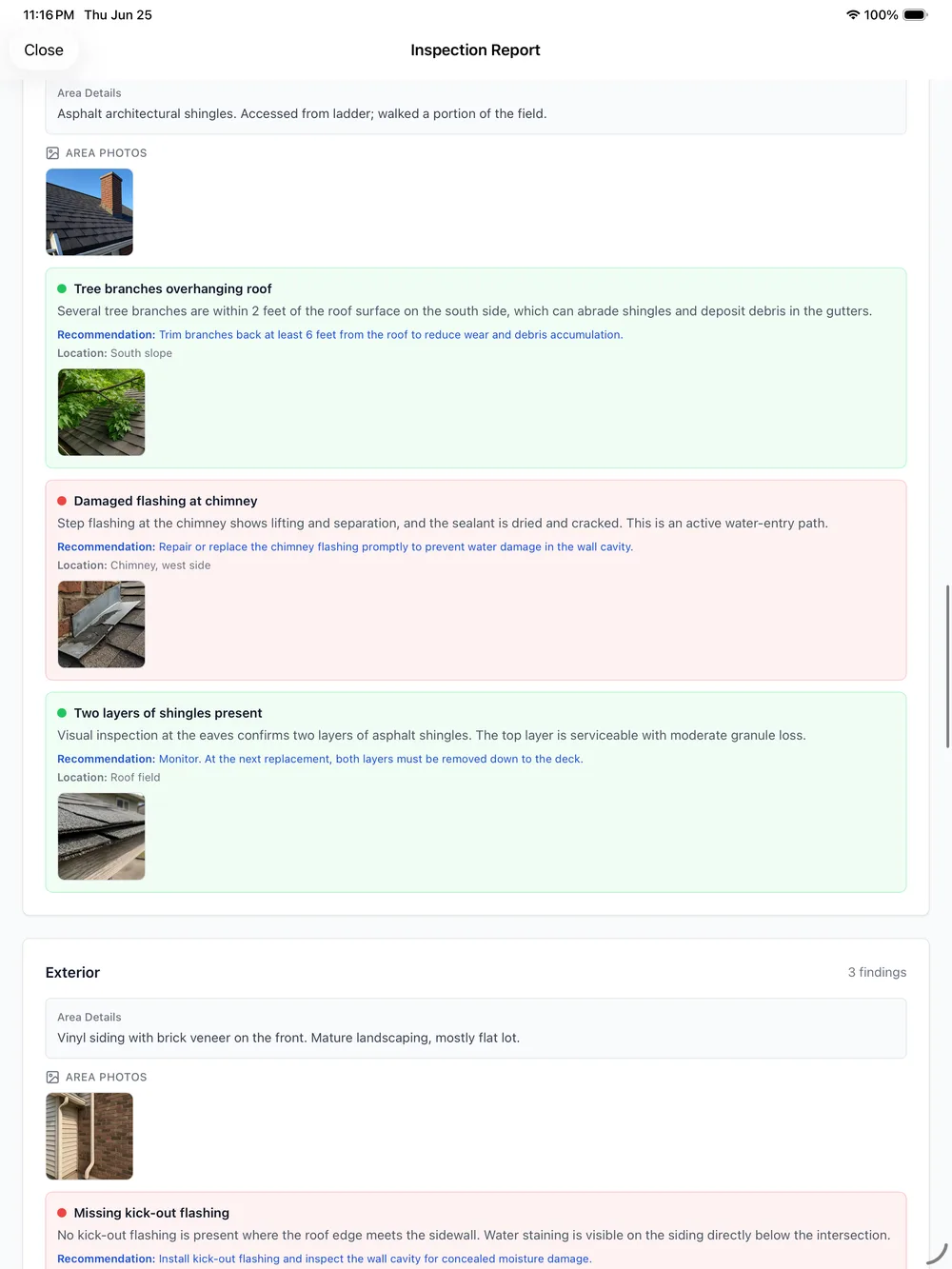
Six parts repeat for every finding, whether the report covers three rooms or thirty. Here is what each one is and why it is there.
Area / system heading
Every finding opens under the exact area or building system it belongs to, so a report with dozens of findings across floors still reads in order.
Photo evidence
The photo you took the moment you spoke the finding attaches directly beneath it, already matched, nothing to sort by hand later.
Severity tag
Each finding carries a plain severity tag, so a reader can scan a long report and know what needs attention first.
Linked code citation
Where a finding matches a requirement, the IRC, NEC, or state code section is linked right there, already attached.
Weather log
Conditions on the day of the inspection are logged automatically, useful the moment a moisture or roof finding gets questioned.
Inspector notes
Your own spoken judgment call sits next to the finding in your own words, not a canned comment pulled from a shared library.
Bigger Job. Same Privacy Stance.
PadInspector is built by Aristide Abrahams, a working home inspector, not a generic software vendor guessing at the job. We will not invent a review count or a rating to sell the point. The fastest proof is walking a real structure with the app in hand.
What we can promise is how client data is treated on every job, small or large: PadInspector never sells or misuses the findings, photos, or recordings captured during an inspection. That data stays tied to the report and the client it belongs to.
Related reading
See the full PadInspector use cases index for every way inspectors use the app, compare the building inspection report software behind every finding, check 4-point inspection software for a narrower scope of the same structure, or see the full PadInspector feature list and PadInspector pricing plans.
Frequently Asked Questions
What is the best building inspection app for iPad?
That depends on the size of the job. Plenty of iPad apps handle a routine single-family walkthrough fine. PadInspector is built for the jobs that outgrow a basic checklist: voice capture organized by area or system, automatic IRC, NEC, and state code lookup, and team mode so more than one inspector can split a bigger building without double-covering the same room.
Do building inspection apps work offline, even in a basement or mechanical room with no signal?
PadInspector does. Recording, transcription, and drafting all run on the iPad itself, so a dead zone in a stairwell or mechanical room will not stall the walkthrough. If a property had no connection at all, the app can still build the report afterward from a recorded video.
Can multiple inspectors split up a large building inspection in the same app?
Yes, with team mode. Every inspector on the job sees which areas the others have already covered in real time, so a multi-floor or multi-unit building gets split cleanly instead of two people documenting the same system or a section getting missed entirely.
Does a building inspection app look up code violations automatically?
PadInspector does this in real time. When a spoken finding matches a requirement, the relevant IRC, NEC, or state code section links to it automatically. To be direct about scope: this is residential-adjacent code intelligence, not a dedicated commercial or IBC code database, so confirm coverage for a strictly commercial project before you rely on it.
Does the app slow down on a bigger, multi-floor building?
The core interaction stays the same no matter how big the structure gets: talk through a finding, attach a photo, move to the next area. Because the app is not asking you to load a heavy back-office dashboard between rooms, a longer job does not add friction the way a bloated all-in-one platform can.
What does a finished building inspection report actually include?
Every finding carries an area or system heading, the photo you took for it, a severity tag, a linked code citation where one applies, the day’s logged weather, and your own spoken notes. The report breakdown further down this page shows exactly how those pieces sit together.
Cover the Whole Building Without Losing the Thread
PadInspector is invite-only while we onboard inspectors carefully. Request an invite and put team mode and automatic code lookup to work on your next multi-system job.
Request an inviteBuilding inspection apps for iPad, built to split a bigger job cleanly and get it done before you leave.