
Building Inspection Report Software
PadInspector is building inspection report software that drafts the report as you talk. Walk the property, describe every finding, and the document assembles itself with code citations, photos, and the day's weather before you leave the driveway.
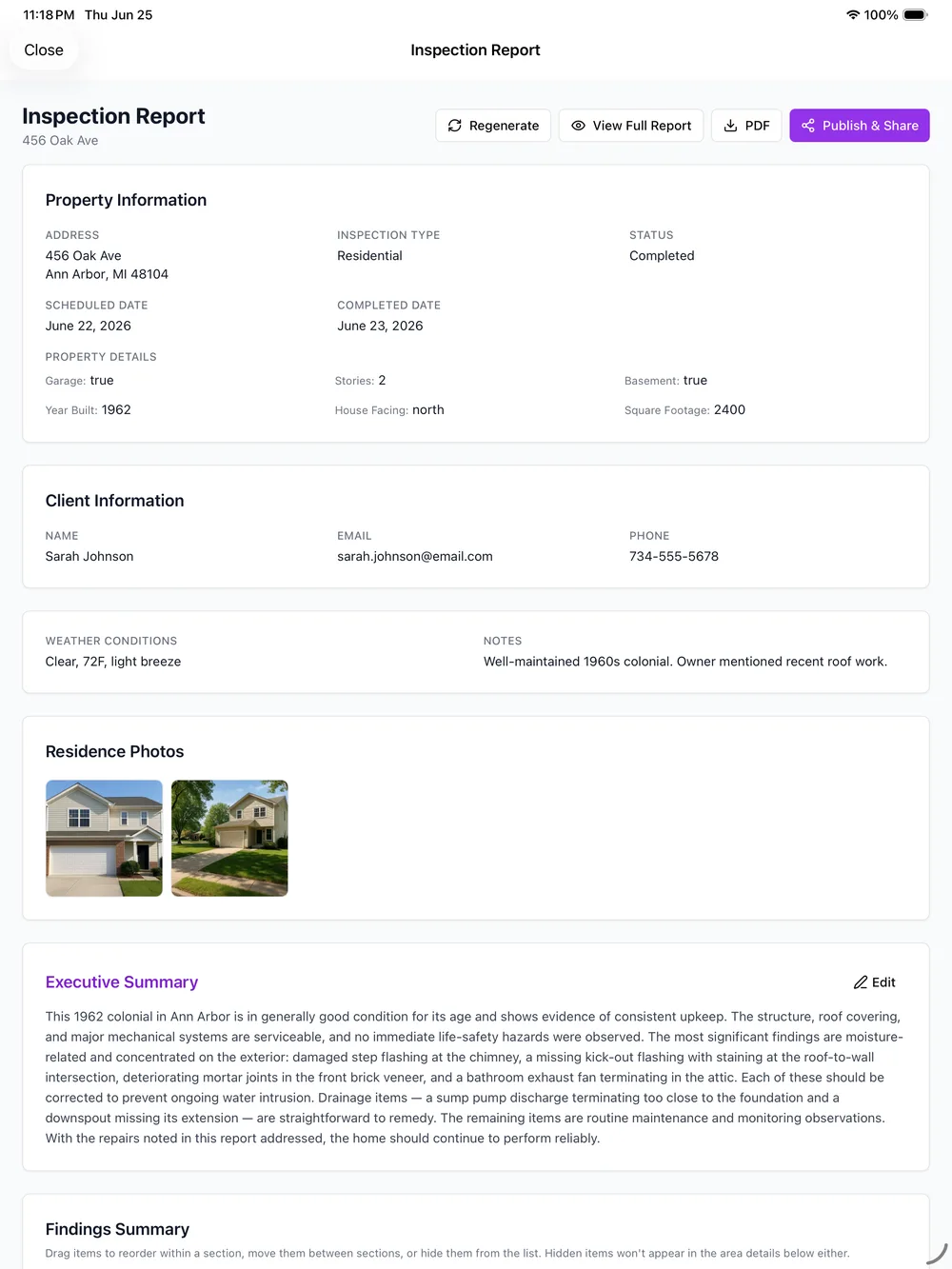
The inspection ends. Then the report writing begins.
Most building inspection tools are built around checklists and photo capture. You tap through a form on site, snap pictures, and the software packages it into a document. That beats a blank page, but you are still the one composing every sentence, tracking down the current code section, and dropping photos into the right spot before the report is ready to send. The generic canned phrasing rarely fits what you actually saw.
None of that touches the parts that create real liability: a roof-leak dispute with no weather record from inspection day, or a finding with no code citation to back it up. PadInspector was built by a working inspector to remove the writing, the codebook search, and the liability gap at the same time. If you are weighing options, our take on the best home inspector software walks through what to look for.
What the generated report is made of
Every building report this software produces follows the same clear structure, so clients, agents, and contractors can read it without a translation guide.
Double-tapped breaker at panel position 14
Lifted shingles at the southwest ridge, monitor for wind damage
Hairline foundation crack, no displacement observed
Water heater TPR valve terminates and drains correctly
Illustrative layout. Your report renders as an interactive web page plus a printable PDF.
Cover page and inspector profile
The report opens with the property address, inspection date, and your name, license, and contact block. Custom branding on the Team plan puts your logo and colors on the cover instead of a generic template.
Findings grouped by area
Roof, exterior, structure, electrical, plumbing, HVAC, and interior each get their own section. Every spoken finding drops into the right area automatically, so nothing is stranded in a catch-all notes field.
Severity color-coding
Each finding is flagged as a safety issue, a monitor item, or satisfactory, so a client and their agent can triage the report at a glance instead of reading every line to find what matters.
Photo attached to each finding
The photo you snapped while describing a defect sits right next to that finding, linked to the moment in the recording it came from. No camera roll to sort, no mismatched captions.
Building-code references
IRC, NEC, and applicable state codes are cited on the findings that need them, so the report reads as contractor-ready documentation rather than a bare list of notes.
Summary and weather log
A summary rolls up the safety items up top, and the weather on inspection day is logged in the report, so a roof-leak claim three dry days later already has an answer on file.
How the report gets built
Three moves, and none of them happen back at the office.
Walk and talk
Describe every finding out loud and snap photos. The report drafts as you speak, with code citations attaching in real time.
Review
Skim the auto-generated report, its severity flags, and the logged weather, then adjust the few lines you want to change.
Send
Deliver a finished interactive web report plus a PDF before you leave the driveway. No evening spent assembling notes.
The software writes the finding, not just the checkbox
Checklist tools ask you to pick a defect from a list and hope the canned phrasing fits. PadInspector listens to what you actually say about a cracked foundation wall or a double-tapped breaker and writes it up in full sentences, in your own voice, as part of the report. The style-learning engine adapts to your phrasing over time, so the finished document sounds like you wrote it, because in a real sense you did, just out loud.
That is the gap between software that speeds up data entry and software that writes the report. See where it fits in the broader home inspector software category before you decide.
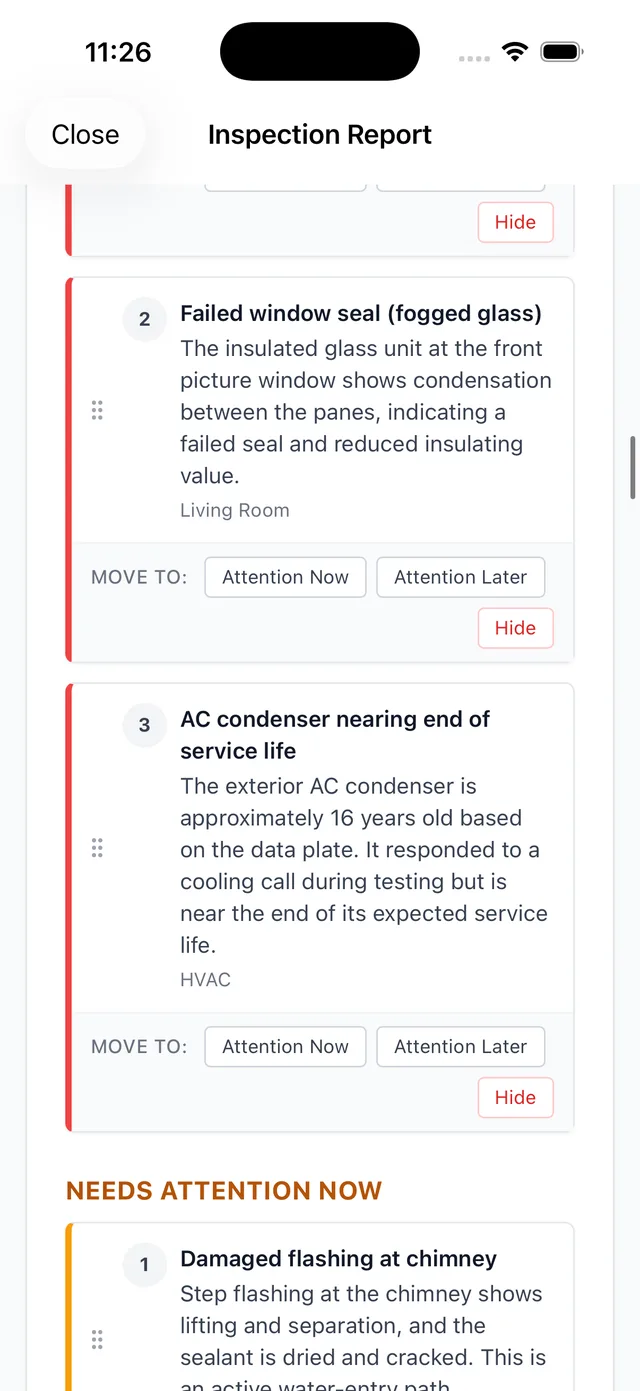
Built into every report
Each capability below is live in the app today.
Automatic building-code lookup, cited in the report
As you describe a defect out loud, PadInspector finds the relevant IRC, NEC, or applicable state code and attaches the citation to that exact finding. What used to mean an evening with the codebook becomes contractor-ready documentation the moment you speak. Combined with voice-to-report drafting, the whole document takes shape while you are still walking the building.
Photo-per-area capture
Every photo auto-attaches to the finding it belongs to and lands in the correct report section.
Inspection-day weather log
Conditions are recorded in the report automatically for liability protection.
Fully offline inspections
Record in a dead-signal basement, or build the whole report later from a recorded video.
Multi-inspector team mode
See who documented which area on one property so nobody duplicates work.
Office Zillow pre-fill
Staff load the property basics from Zillow before anyone arrives on site.
Style learning
The report reads in your voice, and adapts to your phrasing over time.
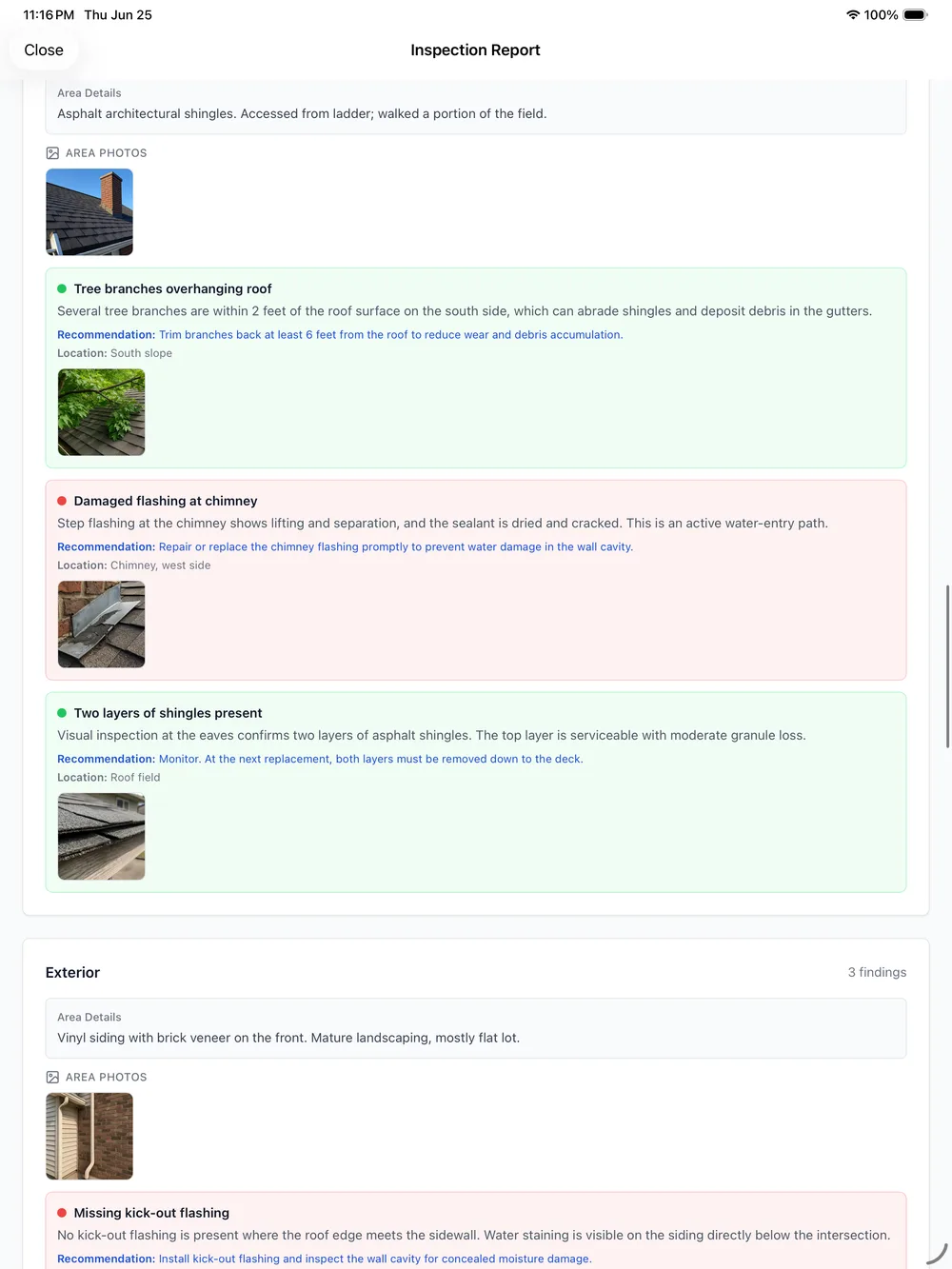
A report clients can actually use
The report a checklist tool exports is often a flat PDF: pass and fail items with a photo bolted on. PadInspector generates an interactive web report alongside the PDF, with sections a client can expand, photos they can zoom, and code citations they can hand straight to a contractor without translating your shorthand first.
It runs on a native iPad, iPhone, and Apple Watch app, not a browser login, so it stays fast in a crawlspace or on a roof. Curious what it runs? Review the home inspection software cost breakdown, or the full PadInspector pricing plans.
Voice-drafted reports vs template-only software
Simple, up-front pricing
Shown here, not hidden behind a demo request.
Starter
- Voice-to-report drafting
- Automatic code citations
- Photo-per-finding capture
Pro
- Everything in Starter
- Offline build-from-video
- Style learning in your voice
Team
- Everything in Pro
- Multi-inspector team mode
- Custom report branding
Full details on the PadInspector pricing plans page.
Building inspection report software questions
What makes building inspection report software actually fast?
Most tools speed up data entry with checklists and photo capture, but you still have to type or tap every finding yourself. PadInspector is voice-first: you walk the property and talk, and the app drafts the finding language in real time. For many inspectors the report is finished before they leave the driveway instead of after an evening of editing.
Does the software cite building codes automatically in the report?
Yes. As you describe a defect, PadInspector looks up the relevant IRC, NEC, or applicable state code and attaches the citation to that finding automatically. That replaces manual codebook searching and hands your client contractor-ready language they can act on.
Can I generate a report without an internet connection?
Yes. Inspections run fully offline, so a dead-signal basement or a rural property is not a problem. The app records locally and uploads in chunks once you are back online. You can even generate a full report later from a recorded walkthrough video with no live connection at all.
How are photos organized in the finished report?
Every photo you snap attaches to the finding you were describing and links back to the exact moment in the voice recording it came from. When the report generates, each photo lands in the right section automatically instead of you sorting a camera roll afterward.
Can multiple inspectors work on one building report?
Yes. Team mode lets several inspectors cover the same property and see who has already documented each area, so nobody duplicates work or skips a section. Office staff can also pre-fill the inspection from Zillow before anyone arrives.
What does building inspection report software from PadInspector cost?
Starter is 79 dollars per month or 790 per year. Pro is 129 dollars per month or 1,290 per year. Team is 129 dollars per month plus 59 dollars for each additional inspector. Pricing is shown up front rather than hidden behind a demo request.
Finish the report before you leave the driveway
PadInspector is invite-only while we onboard inspectors in waves. Request an invite and we will get you set up with the building inspection report software that writes the report as you talk.
Request an invite