Home Inspection Apps
Home inspection apps all list roughly the same features on their homepage: checklists, photo capture, a report template. What actually separates a good one from a mediocre one shows up once you are standing in a crawlspace with no signal, or adding up the monthly bill. Here is what to judge them on, and where PadInspector lands on each.
Every App Lists the Same Features
Scroll through a handful of home inspection app comparison pages and the same feature words repeat everywhere: checklists, photo annotation, scheduling, a report template. None of that tells you what actually happens once you are on the job, tapping through a form in a dim garage, and it definitely does not tell you where the app quietly falls back to a blank page.
The real gap shows up after the walkthrough is over. Most home inspection apps hand you a folder of notes and photos and expect the report to get written later, at a desk, from memory. That is the hour, or hours, this page is really about.

PadInspector Moves the Work Earlier
Instead of tapping through a checklist and writing the report afterward, you talk through each finding the moment you see it. PadInspector transcribes what you say, drafts the report language in real time, attaches the photo you take, and links the applicable code section automatically.
By the time you are back in the truck, most of the report already exists. You are reviewing and signing off, not starting from a blank document. For the full platform picture beyond this one comparison, see our best home inspector software guide.
6 Questions to Judge Any Home Inspection App
Skip the feature checklist. Ask any home inspection app these six questions instead, and judge the honest answer against how PadInspector actually performs.
- 01
Does it write the report while you walk, or just save the typing for later?
Most home inspection apps still work the same way underneath: you tap through a checklist and add notes on-site, then sit down afterward to turn those taps into finished sentences. PadInspector moves that step earlier. You talk through each finding as you see it, the app drafts the language in real time, and the report is organized by area before you close the front door.
- 02
Does it actually work with zero signal, not just "mostly offline"?
Offline support shows up as a checkbox on almost every home inspection app comparison, but the fine print rarely says what happens in a dead-zone crawlspace or a rural property with no bars. PadInspector records, transcribes, and drafts entirely on the device, and it can build a full report from a recorded video if you had no connectivity at all on-site.
- 03
Does it look up code violations for you, or leave you searching a codebook?
Report writing, photo annotation, and scheduling are table stakes across the category. Automatic building-code lookup is not: PadInspector links the applicable IRC, NEC, or state code section to a finding the moment you flag it, so you are not pausing the walkthrough to search a codebook by hand.
- 04
Can more than one inspector work the job without doubling up?
Several apps offer multi-inspector features, but most of that is scheduling and job assignment, not live coordination during a single walkthrough. PadInspector team mode shows who has covered which area in real time, so two inspectors on the same property are not both writing up the electrical panel.
- 05
What does it actually cost, once you add up the fees?
A recurring complaint in home inspection app comparisons is hybrid pricing: a base subscription plus a few dollars per report that quietly erodes margin as volume grows. PadInspector is flat, per inspector: Starter is $79 a month ($790 a year), Pro is $129 a month, and Team is $129 a month plus $59 for each additional inspector, no per-report surcharge on top.
- 06
What happens to your client data afterward?
It is worth asking directly, since it rarely comes up in a feature list. The recordings, photos, and findings PadInspector processes exist to build your client’s report and nothing else. That data is never sold or repurposed to market to your clients after the job is done.
What a Job Actually Looks Like on PadInspector
Arrive and pull up the job
Office staff can pre-fill the inspection from Zillow property data before you ever get out of the truck.
Walk and talk
Move through each area and describe what you see. PadInspector transcribes it, drafts the language, and attaches your photos automatically.
Quick review
Skim the drafted findings, adjust anything that needs it, and confirm the codes it linked automatically.
Send and go home
Sign off and send before you leave the driveway, instead of rebuilding the report from memory at a desk that night.
You Still Sign Off on Everything
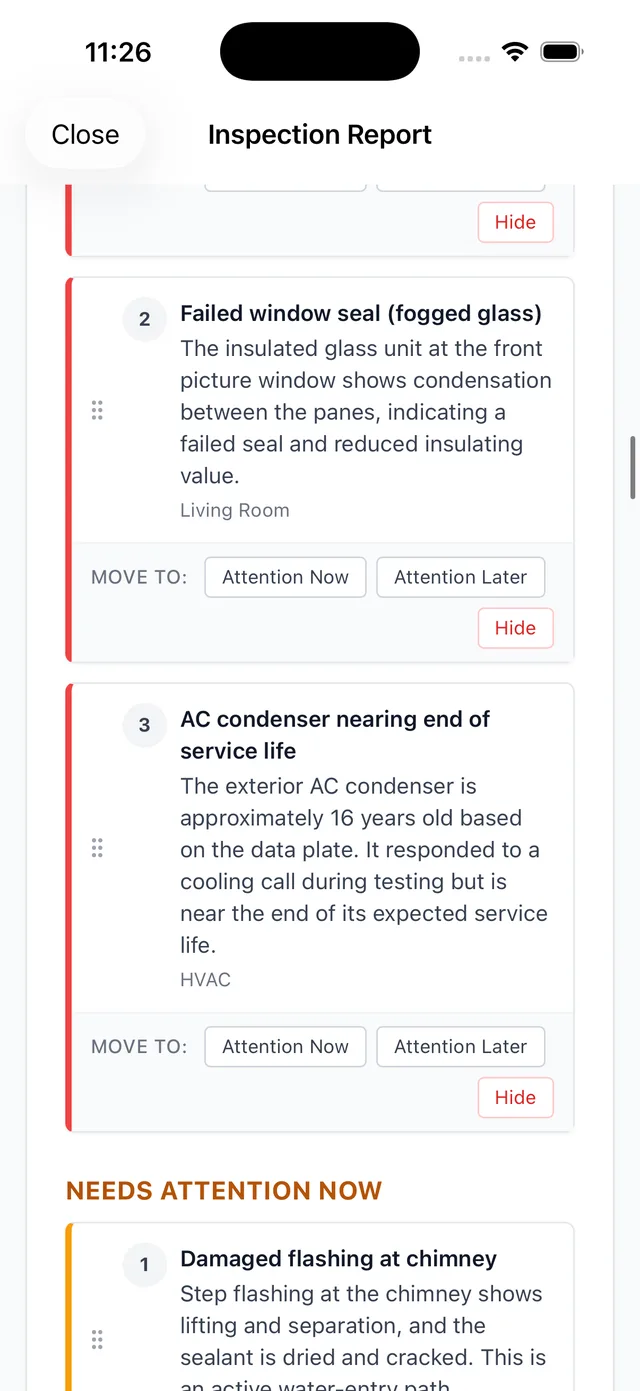
Drafting the report as you talk does not mean anything ships without you. Before a report goes to a client, PadInspector hands the full draft back for a quick review. You adjust wording, confirm the linked codes, and sign off. Nothing goes out that you have not approved.
Want the numbers side by side against other tools first? Read our compare home inspection software breakdown, or check the full home inspection software cost picture before you decide.
Built by an Inspector, Not Just for One
PadInspector is invite-only while onboarding stays deliberate. It was founded by a working home inspector, and it runs natively on iPad, iPhone, and Apple Watch rather than trying to be every app on every platform at once.
Related reading
Already narrowed things down to an iPad workflow? See home inspection software for iPad. Prefer something simpler to hand off to a new hire? Look at easy inspection software. Or see every PadInspector feature and the full PadInspector pricing plans in one place, or see every way inspectors use PadInspector.
Frequently Asked Questions
Which home inspection app is actually the best one?
There is no single answer that fits every inspector, and we are not going to invent a ranking to pretend otherwise. What matters is judging any app you are considering against real criteria: does it draft the report as you inspect, does it truly work offline, does it look up codes, and what does it cost once fees are included. PadInspector was built to lead on those specific points.
Do home inspection apps work offline?
Most claim some level of offline support, but the depth varies a lot. PadInspector records, transcribes, and drafts the report fully on the device with zero connectivity required, and can even assemble a report from a recorded video if you had no signal at all on-site.
How much do home inspection apps cost, and are there hidden fees?
Pricing across the category ranges roughly from about $60 a month to $200 a month, and several platforms add a per-report fee on top of the subscription. PadInspector charges a flat per-inspector rate with no per-report surcharge: $79 a month for Starter, $129 a month for Pro, and $129 a month plus $59 per additional inspector for Team.
Can more than one inspector use the same app on a job?
Many apps support adding inspectors to an account, but that usually means scheduling and assignment rather than live coordination. PadInspector team mode shows in real time which areas of a property each inspector has already covered, so two people on one job are not duplicating the same room.
Do home inspection apps write the report for you, or just organize checklists and photos?
Most organize: they give you a checklist, a place for photos, and a template to fill in afterward. PadInspector actually drafts the report language in real time as you talk through each finding on-site, so there is far less left to write once the walkthrough is over.
What devices do home inspection apps run on?
Some are built to run across Windows, Mac, iOS, and Android. PadInspector is different by design: it is a native iPad, iPhone, and Apple Watch app, built specifically for how an Apple-device inspector moves through a property, not a browser tab stretched across every platform.
Judge PadInspector on the Same 6 Questions
PadInspector is invite-only while we onboard inspectors carefully. Request an invite and see how it holds up against whatever else you are comparing.
Request an invite